![TD - symbol.svg]](https://tourneydirect.com/hubfs/Tourney%20Direct/TD%20-%20symbol.svg)
Messaging Hub Overview
The Messaging Hub provides two communication tools:
-
Event Staff Messaging (Direct Thread Messaging)
-
Group Email (Broadcast Email)
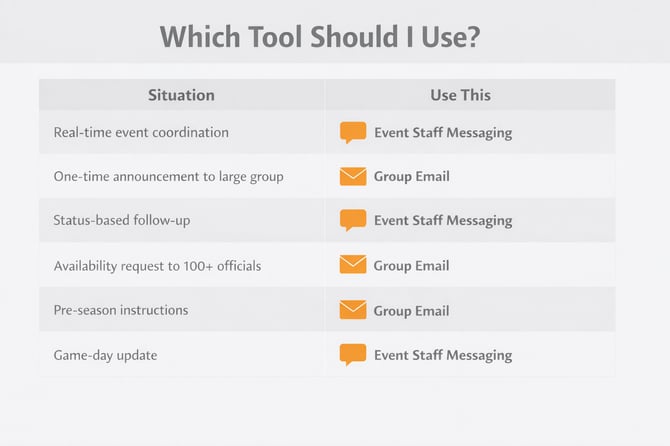
Each tool serves a different purpose. Use Event Messaging for coordination and Group Email for announcements.
Event Staff Messaging (Direct Thread Messaging)
What It Is:
A live messaging thread tied to:
-
A specific event
-
A specific role
-
A specific status group
Messages stay organized by event and audience.
How to Use:
-
Go to Message Event Staff
-
Select an Event
-
Choose:
-
Recipient Role
-
Recipient Status
-
-
Click + New Message
-
Type your message and send
Best For:
Any communication with staff pertaining to an event leading up to, during, and after the event.-
Real-time updates
-
Weather delays
-
Field changes
-
Assignment adjustments
-
On-site coordination
-
Status-based follow-ups
- Sending links, post event surveys, thank you messages and more
What It Does Well:
✔ Organized by event
✔ Filter by role + status
✔ Keeps communication centralized
✔ Prevents duplicate outreach
✔ Sends attachments
✔ Emoji's for engagement
Email Officials Group (Broadcast Email)
What It Is:
An email tool for sending formatted emails to an entire officiating group.
This is a broadcast-style communication tool.
How to Use:
-
Go to Email Groups
-
Select an Officiating Group
-
Review recipient preview
-
Enter subject
-
Draft your message (or use AI assist)
-
Send test email (optional)
-
Click Send
You will see delivery confirmation and recent activity below.
Best For:
-
Availability reminders
-
Policy updates
-
Pre-event instructions
-
Season announcements
-
Large group communication
What It Does Well:
✔ Sends to entire groups
✔ Includes formatted email content
✔ Supports links
✔ Provides delivery tracking
✔ Allows test sends
What It Does NOT Do (Current Version):
-
Replies do not route back through the system
-
No attachment support yet
-
No reply-all thread
For replies, recipients should email the sender directly using the email address provided in the message that the system adds for you.
Recommended Workflow
Before Event:
Use Group Email for availability + instructions.
Leading Up To and Week of Event:
Use Event Staff Messaging for status-based updates.
Day of Event:
Use Event Staff Messaging for operational and time-sensitive communication.